++++++++++++
more on privacy in this IMS blog
https://blog.stcloudstate.edu/ims?s=privacy
Tag: youtube
ed videos
Five Good Alternatives to YouTube for Finding Educational Videos https://t.co/BrKUw5Q4d1
— Richard Byrne (@rmbyrne) May 19, 2019
Even if you use the search refinement tools in YouTube, it can be a challenge to find a clip that is appropriate for your students.
video editing
Public Service Announcements using visuals
Troy Shafer’s Health class.
Steps to promote your own brand versus using generic visuals:
- Plan your project by considering the following items
- create a very basic script and timeline
- take footage (pictures and movie)
https://blog.stcloudstate.edu/ims/2015/10/21/handout-videos-on-mobile-devices/
- you can mix your footage with royalty-free one: e.g. https://blog.stcloudstate.edu/ims/2018/11/01/public-domain-video-clips/z
and with screen capture:
https://blog.stcloudstate.edu/ims/2014/04/24/5-options-for-creating-screen-capture-images-and-videos-including-on-chromebooks/
Here is more information on apps and video tips for video editing using mobile devices:
https://blog.stcloudstate.edu/ims/2014/06/19/how-to-use-the-free-youtube-video-editor/
more information on video recording and editing tools
https://blog.stcloudstate.edu/ims/2016/12/21/tools-video-creation/ (for Android devices)
- Use your script, footage and app to create your video
Here is a video recording of myself using Splice for iOS (iPhone) to create one:
https://zoom.us/recording/share/9BordM-NxG0v8VJhjMVFXZV3rXP8YAsVzam80HBE0sywIumekTziMw - YouTube Channel.
Use your company (preferable to your private) GMAIL to log into YouTube.
Create a channel for your activity:
- live video. Live video is the most difficult but also most authentic
YouTube / Google Hangouts
Facebook Live
Twitter / Periscope : https://www.periscope.tv/
https://help.twitter.com/en/using-twitter/twitter-live
+++++++++++
more info for Health classes:
https://blog.stcloudstate.edu/ims/2015/02/18/digital-literacy-instruction-for-scsu-health-class/
academic libraries and social media
Howard, H. A. (2018). Academic Libraries on Social Media: Finding the Students and the Information They Want. Information Technology and Libraries, 37(1), 8–18. https://doi.org/10.6017/ital.v37i1.10160
In his book Tell Everyone: Why We Share and Why It Matters, Alfred Hermida states, “People are not hooked on YouTube, Twitter or Facebook but on each other. Tools and services come and go; what is constant is our human urge to share.”1 Libraries are places of connection, where people connect with information, technologies, ideas, and each other. As such, libraries look for ways to increase this connection through communication.
Academic libraries have been slow to accept social media as a venue for either promoting their services or academic purposes. A 2007 study of 126 academic librarians found that only 12 percent of those surveyed “identified academic potential or possible benefits” of Facebook while 54 percent saw absolutely no value in social media.2 However, the mission of academic libraries has shifted in the last decade from being a repository of knowledge to being a conduit for information literacy; new roles include being a catalyst for on-campus collaboration and a facilitator for scholarly publication within contemporary academic librarianship.3 Academic librarians have responded to this change, with many now believing that “social media, which empowers libraries to connect with and engage its diverse stakeholder groups, has a vital role to play in moving academic libraries beyond their traditional borders and helping them engage new stakeholder groups.”4
The project focused on three research questions:
1. What social media platforms are students using?
2. What social media platforms do students want the library to use?
3. What kind of content do students want from the library on each of these platforms?
1. What social media platforms are students using?
2. What social media platforms do students want the library to use?
3. What kind of content do students want from the library on each of these platforms?
survey using the web-based Qualtrics
The social media platforms included were Facebook, Flickr, G+, Instagram, LinkedIn, Pinterest, Qzone, Renren, Snapchat, Tumblr, Twitter, YouTube, and Yik Yak
The second survey also lasted for three weeks starting in mid-April of the spring 2017 semester. As a participation incentive, students who completed the initial survey and the second survey had an opportunity to enter a drawing for a $25 Visa gift card.

we intend to develop better communication channels, a clear social media presence, and a more cohesive message across the Purdue libraries. Under the direction of our new director of strategic communication, a social media committee was formed with representatives from each of the libraries to contribute content for social media. The committee will consider expanding the Purdue Libraries’ social media presence to communication channels where students have said they are and would like us to be.
+++++++++++++
More on social media and libraries in this IMS blog
https://blog.stcloudstate.edu/ims?s=social+media+libraries
More on social media and libraries in this IMS blog
https://blog.stcloudstate.edu/ims?s=social+media+libraries
app smashing
My note:
#appsmashing must be the evolution of the ~ 2010 #mashup

from: http://www.zigzagstech.com/app-smashing
http://k12technology.weebly.com/app-smashing.html
App Smashing is the process of using multiple apps to create projects or complete tasks. App Smashing can provide your students with creative and inspired ways to showcase their learning and allow you to assess their understanding and skills.
http://thinglinkblog.com/2014/12/18/6-amazing-appsmashes-to-inspire-creativity/
http://edtechteacher.org/unleashing-creativity-greg-kulowiec-app-smashing-from-beth-holland/
https://padlet.com/lmoore4/72nzkwdipo5y
What is an App Smash?
Content created in one app transferred to and enhanced by a second app and sometimes third. Preferably the final product is then published to the web – remember, digital presence is the new résumé (CV).
Reasons to App Smash:
- It demands creative thinking
- It demands more from the technology (value for money)
- It turns the issue of not having a ‘wonder app’ into a positive
- It removes any restrictions to take a topic as far as it can be taken.
- It often results in more engaging learning products
- It’s a fun challenge for ‘digital natives’
Key rules for successful App Smashing:
- Use the Camera Roll as your main conduit between apps
- Leave the app choice to the students
- Have a list of apps capable of smashing content together (See below)
http://blog.whooosreading.org/19-apps-to-make-app-smashing-a-smashing-success/
TELLAGAMI,
GREEN SCREEN DOINK
YAKIT KIDS AND CHATTERPIX
EDUCREATIONS AND DOCERI
BOOK CREATOR
GOOGLE DOCS, SLIDES
STRIP CREATOR
SCOODLEJAM
HELLO CRAYON
GOOGLE DRAWING
TOONTASTIC
PUBLISHING
thinglink, youtube, padlet, seesaw, realtimes,
social media and altmetrics
categories: Digital literacy, social media
Sugimoto, C. R., Work, S., Larivière, V., & Haustein, S. (2016). Scholarly use of social media and altmetrics: a review of the literature. Retrieved from https://arxiv.org/abs/1608.08112
One of the central issues associated with altmetrics (short for alternative metrics) is the identification of communities engaging with scholarly content on social media (Haustein, Bowman, & Costas, 2015; Neylon, 2014; Tsou, Bowman, Ghazinejad, & Sugimoto, 2015) . It is thus of central importance to understand the uses and users of social media in the context of scholarly communication.
most identify the following major categori es: social networking, social bookmarking, blogging, microblogging, wikis , and media and data sharing (Gu & Widén -Wulff, 2011; Rowlands, Nicholas, Russell, Canty, & Watkinson, 2011; Tenopir et al., 2013) . Some also conside r conferencing, collaborative authoring, scheduling and meeting tools (Rowlands et al., 2011) or RSS and online documents (Gu & Widén -Wulff, 2011; Tenopir et al., 2013) as social media. The landscape of social media, as well as that of altmetrics, is constantly changing and boundaries with othe r online platforms and traditional metrics are fuzzy. Many online platforms cannot be easily classified and more traditional metrics , such as downloads and mentions in policy documents , have been referred to as altmetrics due to data pr ovider policies.
the Use of social media platforms for by researchers is high — ranging from 75 to 80% in large -scale surveys (Rowlands et al., 2011; Tenopir et al., 2013; Van Eperen & Marincola, 2011) .
but
less than 10% of scholars reported using Twitter (Rowlands et al., 2011) , while 46% used ResearchGate (Van Noorden, 2014) , and more than 55% use d YouTube (Tenopir et al., 2013) —it is necessary to discuss the use of various types of social media separately . Furthermore, there i s a distinction among types of us e, with studies showing higher uses of social media for dissemination, consumption, communication , and promotion (e.g., Arcila -Calderón, Piñuel -Raigada, & Calderín -Cruz, 2013; Van Noorden, 2014) , and fewer instances of use for creation (i.e., using social media to construct scholarship) (British Library et al., 2012; Carpenter, Wetheridge, Tanner, & Smith, 2012; Procter et al., 2010b; Tenopir et al., 2013) .
Frequently mentioned social platforms in scholarly communication research include research -specific tools such as Mendeley, Zotero, CiteULike, BibSonomy, and Connotea (now defunct) as well as general tools such as Delicious and Digg (Hammond, Hannay, Lund, & Scott, 2005; Hull, Pettifer, & Kell, 2008; Priem & Hemminger, 2010; Reher & Haustein, 2010) .
Social data sharing platforms provide an infrastructure to share various types of scholarly objects —including datasets, software code, figures, presentation slides and videos —and for users to interact with these objects (e.g., comment on, favorite, like , and reuse ). Platforms such as Figshare and SlideShare disseminate scholars’ various types of research outputs such as datasets, figures, infographics, documents, videos, posters , or presentation slides (Enis, 2013) and displays views, likes, and shares by other users (Mas -Bleda et al., 2014) . GitHub provides for uploading and stor ing of software code, which allows users to modify and expand existing code (Dabbish, Stuart, Tsay, & Herbsleb, 2012) , which has been shown to lead to enhanced collaboratio n among developers (Thung, Bissyande, Lo, & Jiang, 2013) . As w ith other social data sharing platforms, usage statistics on the number of view and contributions to a project are provided (Kubilius, 2014) . The registry of research data repositories, re3data.org, ha s indexed more than 1,200 as of May 2015 2 . However, only a few of these repositories (i.e. , Figshare, SlideShare and Github) include social functionalities and have reached a certain level of participation from scholars (e.g., Begel, Bosch, & Storey, 2013; Kubilius, 2014) .
Video provide s yet another genre for social interaction and scholarly communication (Kousha, Thelwall, & Abdoli, 2012; Sugimoto & Thelwall, 2013) . Of the various video sharing platforms, YouTube, launched in 2005, is by far the most popular
A study of UK scholars reports that the majority o f respondents engaged with video for scholarly communication purposes (Tenopir et al., 2013) , yet only 20% have ever created in that genre. Among British PhD students, 17% had used videos and podcasts passively for research, while 8% had actively contributed (British Library et al., 2012) .
Blogs began in the mid -1990s and were considered ubiquitous by the mid- 200 0s (Gillmor, 2006; Hank, 2011; Lenhart & Fox, 2006; Rainie, 2005) . Scholarly blogs emerged during this time with their own neologisms (e.g., blogademia , blawgosphere , bloggership) and body of research (Hank, 2011) and were considered to change the exclusive structure of scholarly communication
Technorati, considered t o be on e of the largest ind ex of blogs, deleted their entire blog directory in 2014 3 . Individual blogs are also subject to abrupt cancellations and deletions, making questionable the degree to which blogging meets the permanence criteria of scholarly commu nication (Hank, 2011) .
ResearchBlogging.org (RB) — “an aggregator of blog posts referencing peer -reviewed research in a structured manner” (Shema, Bar -Ilan, & Thelwall, 2015, p. 3) — was launched in 2007 and has been a fairly stable structure in the scholarly blogging environment. RB both aggregates and —through the use of the RB icon — credentials scholarly blogs (Shema et al., 2015) . The informality of the genre (Mewburn & Thomson, 2013) and the ability to circumve nt traditional publishing barr iers has led advocates to claim that blogging can invert traditional academic power hierarchies (Walker, 2006) , allow ing people to construct scholarly identities outside of formal institutionalization (Ewins, 2005; Luzón, 2011; Potter, 2012) and democratize the scientific system (Gijón, 2013) . Another positive characteristic of blogs is their “inherently social” nature (Walker, 2006, p. 132) (see also Kjellberg, 2010; Luzón, 2011 ). Scholars have noted the potential for “communal scholarship” (Hendrick, 2012) made by linking and commenting, calling the platform “a new ‘third place’ for academic discourse” (Halavais, 2006, p. 117) . Commenting functionalities were seen as making possible the “shift from public understanding to public engagement with science” (Kouper, 2010, p. 1) .
Studies have also provided evidence of high rate s of blogging among certain subpopulations: for example, approximately one -third of German university staff (Pscheida et al., 2013) and one fifth of UK doctoral students use blogs (Carpenter et al., 2012) .
Academics are not only producers, but also consumers of blogs: a 2007 survey of medical bloggers foundthat the large majority (86%) read blogs to find medical news (Kovic et al., 2008)
Mahrt and Puschmann (2014) , who defined science blogging as “the use of blogs for science communication” (p. 1). It has been similarly likened to a sp ace for public intellectualism (Kirkup, 2010; Walker, 2006) and as a form of activism to combat perceived biased or pseudoscience (Riesch & Mendel, 2014. Yet, there remains a tension between science bloggers and science journalists, with many science journals dismissing the value of science blogs (Colson, 2011)
.
while there has been anecdotal evidence of the use of blogs in promotion and tenure (e.g., (Podgor, 2006) the consensus seem s to suggest that most institutions do not value blogging as highly as publishing in traditional outlets, or consider blogging as a measure of service rather than research activity (Hendricks, 2010, para. 30) .
Microblogging developed out of a particular blogging practice, wherein bloggers would post small messages or single files on a blog post. Blogs that focused on such “microposts” were then termed “tumblelogs” and were described as “a quick and dirty stream of consciousness” kind of blogging (Kottke, 2005, para. 2)
most popular microblogs are Twitter (launched in 2006), tumblr (launched in 2007), FriendFeed (launched in 2007 and available in several languages), Plurk (launched in 2008 and popular in Taiwan), and Sina Weibo (launched in 2009 and popular in China).
users to follow other users, search tweets by keywords or hashtags, and link to other media or other tweets
.
Conference chatter (backchanneling) is another widely studied area in the realm of scholarly microblogging. Twitter use at conferences is generally carried out by a minority of participants
Wikis are collaborative content management platforms enabled by web browsers and embedded markup languages.
Wikipedia has been advocated as a replacement for traditional publishing and peer review models (Xia o & Askin, 2012) and pleas have been made to encourage experts to contribute (Rush & Tracy, 2010) . Despite this, contribution rates remain low — likely hindered by the lack of explicit authorship in Wikipedia, a cornerstone of the traditional academic reward system (Black, 2008; Butler, 2008; Callaway, 2010; Whitworth & Friedman, 2009) . Citations to scholarly documents —another critical component in the reward system —are increasingly being found i n Wikiped ia entries (Bould et al., 2014; Park, 2011; Rousidis et al., 2013) , but are no t yet seen as valid impact indicators (Haustein, Peters, Bar -Ilan, et al., 2014) .
The altmetrics manifesto (Priem et al., 2010, para. 1) , altmetrics can serve as filters , which “reflect the broad, rapid impact of scholarship in this burgeoning ecosystem”.
There are also a host of platforms which are being used informally to discuss and rate scholarly material. Reddit, for example, is a general topic platform where users can submit, discuss and rate online content. Historically, mentions of scientific journals on Reddit have been rare (Thelwall, Haustein, et al., 2013) . However, several new subreddits —e.g., science subreddit 4 , Ask Me Anything sessions 5 –have recently been launched, focusing on the discussion of scientific information. Sites like Amazon (Kousha & Thelwall, 2015) and Goodreads (Zuccala, Verleysen, Cornacchia, & Engels, 2015) , which allow users to comment on and rate books, has also been mined as potential source for the compilation of impact indicators
libraries provide services to support researchers’ use of social media tools and metrics (Lapinski, Piwowar, & Priem, 2013; Rodgers & Barbrow, 2013; Roemer & Borchardt, 2013). One example is Mendeley Institutional Edition, https://www.elsevier.com/solutions/mendeley/Mendeley-Institutional-Edition, which mines Mendeley documents, annotations, and behavior and provides these data to libraries (Galligan & Dyas -Correia, 2013) . Libraries can use them for collection management, in a manner similar to other usage data, such as COUNTER statistics (Galligan & Dyas -Correia, 2013) .
Factors affecting social media use; age, academic rank and status, gender, discipline, country and language,
++++++++++++++++++++++++++
h-index
+++++++++++++
more on altmetrics in this IMS blog:
https://blog.stcloudstate.edu/ims?s=altmetrics
video resources
47+ Alternatives to Using YouTube in the Classroom
http://www.freetech4teachers.com/2010/09/47-alternatives-to-using-youtube-in.html
More Than 40 Alternatives to YouTube
http://www.freetech4teachers.com/2016/03/more-than-40-alternatives-to-youtube.html
convocation winter 2016
Short link the information below on the IMS blog: https://blog.stcloudstate.edu/ims/?p=4441 and even shorter one: http://scsu.mn/1RsQErr
Weds 6th–
Session I 10-11:15 Voyageurs North (Atwood)
Title
Engage your students: connect CMS (D2L) to social media to enhance the learning process.
Plamen Miltenoff and Emil Towner
Join us online via Adobe Connect: http://scsuconnect.stcloudstate.edu/ims (please login as a “guest” and use your real name)
Outline
In this rapid succession of examples, one can experience a showcase how to enhance students’ engagement by modernizing D2L experience through connection with social media. Bring your own examples and participate in a discussion, which aims finding the right tools for your class and field of study.
Audience:
beginners to advanced
Prerequisite:
come with your own social media accounts: Facebook, Twitter, Instagram, Pinterest, Vine
Outcomes:
By the end of this session, the participants will have an idea about peculiarity of each of the social media tools: Facebook, Twitter, Instagram, Pinterest, Vine
By the end of the session, the participants will be familiar with the integration of each of the social media tool into D2L
By the end of the session, the participants will be able to asses to what extent each particular tool fits their field of study
By the end of the session, the participants will be able to compare the pedagogical advantages and disadvantages of the social media tools compared to D2L
Useful links to contact us via social media:
IMS blog: https://blog.stcloudstate.edu/ims
IMS Facebook: https://www.facebook.com/InforMediaServices?ref=hl
IMS Twitter: https://twitter.com/SCSUtechinstruc
IMS Pinterest: http://www.pinterest.com/scsutechnology/
IMS Instagram: http://instagram.com/scsutechinstruct
IMS YouTube: https://www.youtube.com/channel/UC_UMIE5r6YB8KzTF5nZJFyA
IMS Google+: https://plus.google.com/u/0/115966710162153290760/posts/p/pub
IMS LinkedIn: http://www.linkedin.com/in/scsuinstructionaltechnology
Plan – Plamen Miltenoff:
- Introduce each other and share the reason and interest to attend this discussion; what are the expectations from this discussion
- We offer free technical assistance in a close relationship with your pedagogical goals:
https://blog.stcloudstate.edu/ims/2015/10/06/technology-instruction-available-free/ - Why social media in education? What are the advantages, disadvantages?
Please consider the following presentations as a foundation for this discussion:
https://blog.stcloudstate.edu/ims/2015/04/08/lms-and-social-media/
Please consider the following survey about your opinion regarding social media in education:
*http://aidemoreto.polldaddy.com/s/social-media-in-education*
please have the short link: http://scsu.mn/1Z8EFFx
most recent contemplations about blogs and social media in general:
https://blog.stcloudstate.edu/ims/2016/01/01/4507/
- D2L and Facebook
What is the problem with D2L? https://blog.stcloudstate.edu/ims/2015/04/09/lms-as-a-concept-under-scrutiny/
Facebook in a learning environment MUST BE conducted using a Facebook group.
Unless the instructor is SPECIFICALLY using h/er FB account strictly for educational reasons and there is no personal content, the instructor can create a class-related group, with their personal FB account. While the account is personal, the FB group has NO access to the personal FB account.
Facebook Page is different from Facebook Group. The first is commercially oriented and thus, not recommended and to a great degree not suitable for educational purposes.
Facebook Provides New Admin Tools for Managing Page Communication
Facebook Improves News Feed for Slower Network Connections:
https://blog.stcloudstate.edu/ims/2015/12/13/improvements-in-social-media-tools/
Facebook group account can be used for: discussions, sharing materials / visuals, calendar
D2L Discussions compared to Facebook Group discussions – http://www.adweek.com/socialtimes/facebook-groups-pages/313736
D2L content compared to Facebook Group Wall
D2L calendar compared to FB calendar
D2L news RSS compared to FB Group alert. - D2L and Twitter
microblogging of 140 characters is often viewed as limiting. However, it can be the ultimate test how well students understand the learning material: making someone sum up in 140 characters what they learned this particular week in their class can take a lot of rewriting.
D2L allows a widget on its main page, where students can view and tweet. Students also can view and tweet from their mobile devices.
Tweeting during class is becoming mainstream in K12, also called “backchanneling.” Harnessing peers help to understand a concept discussed in class can save both time and efforts on the instructors’ side
Twitter is “making your twitter.com timeline more immersive by uncropping photos, so you can experience and present them as they were meant to be viewed.” https://blog.stcloudstate.edu/ims/2015/12/13/improvements-in-social-media-tools/ - D2L and Instagram
Instagram is a social media service, which allows both still images and videos (15 sec).
The bottom-line to evaluate if fitting your field of study is: can the content be narrated or is it much better if visualized. If the latter, Instagram can be your salvation for quick and dirty way to bring imagery, instead of trying to explain by words.
https://blog.stcloudstate.edu/ims/2014/10/14/instagram-apps/
Instagram can be shared vertically across Facebook, Twitter, Google+ and other platforms.
https://blog.stcloudstate.edu/ims/2014/09/25/pinterest-and-instagram/
Instagram in the classroom
https://blog.stcloudstate.edu/ims/2014/09/15/instagram-in-the-classroom/
Master Instagram in 8 Simple Steps https://blog.stcloudstate.edu/ims/2014/09/11/how-to-master-instagram-in-8-simple-steps/ - D2L and Pinterest
QR codes are used by Lorie Crane from Nursing as a gamification techniques for students to learn human bones. The disadvantage of the QR codes is that they physically are placed in the classroom. Pinterest can provide the same gamification environment, but the students can access it anywhere/anytime with their mobile devices. The links to the pin[s] can be provided in the D2L : content area (as learning materials/readings), discussion area, News area. They can be also used as part of the D2L quizzes
https://blog.stcloudstate.edu/ims/2014/09/25/pinterest-and-instagram/
Instagram defines and shapes brands while Pinterest sells brands.
Pinterest is about curating and discovering information.
https://blog.stcloudstate.edu/ims/2014/09/25/pinterest-and-instagram/
Using hashtags: https://blog.stcloudstate.edu/ims/2014/07/13/3-things-you-didnt-know-you-can-do-on-pinterest/
16 Ways Teachers Use Pinterest https://blog.stcloudstate.edu/ims/2014/02/10/16-ways-teachers-use-pinterest/
Free Pinterest-Style Education Service Hosts Common Core Teaching Aids https://blog.stcloudstate.edu/ims/2013/11/20/free-pinterest-style-education-service-hosts-common-core-teaching-aids/
Teachers on Pinterest – A Great Resource for Teachers ~ Educational Technology and Mobile Learning https://blog.stcloudstate.edu/ims/2013/11/02/teachers-on-pinterest-a-great-resource-for-teachers-educational-technology-and-mobile-learning/
- D2L and Vine
Vine is a social media services, which provides the ability to share 7 sec videos. Vine is becoming more popular then Instagram (15 sec videos), with the simplicity to create short videos. Students can take sequence of short videos, which amount to 7 sec to reflect the main points of a project. E.g.: chemical reaction, biology dissection, progress of engineering planning, solving a math formula.
URL to the vine can be posted in the D2L discussion area for further collaborative effort or for peers’ and instructions evaluation
Vines are a click away from a FB group page or, with the right handle and hashtag, to a Twitter discussion
The bottom-line to evaluate if fitting your field of study is: can the content be narrated or is it much better if visualized. If the latter, Vine can be your salvation.
How to Create Social Videos With Your Smartphone https://blog.stcloudstate.edu/ims/2015/01/10/social-videos-with-your-smartphone/ - D2L and YouTube, EdPuzzle (https://edpuzzle.com/), etc
YouTube Unveils New Trending Tab
https://blog.stcloudstate.edu/ims/2015/12/13/improvements-in-social-media-tools/Per SCSU IT disclaimer: MediaSpace (Kaltura) is a free, cloud-based video repository solution for campus that allows faculty and staff to upload and distribute video and audio content for academic or administrative purposes. Facilitators will discuss potential uses of MediaSpace for campus, demonst rate how to create Webcam and screen recordings, upload audio/video, and embed or link to MediaSpace content from D2L or a web site. YouTube is owned by Google and the integration, including statistics and analytics by Google are way beyond MediaSpace. The only selling point of MediaSpace is the FERPA requirement by MnSCU to host privacy data on a MnSCU owned server - Google+
Google+ is indirect competition with any CMS, D2L included, with its GOogle Classroom platform (https://classroom.google.com/ineligible). K12 and higher institutions are outsourcing to GMAIL and with Google Hangouts (Skype also), one can share video, audio and desktops, which makes Adobe Connect + D2L way behind in integration even before Google Drive is mentioned.
Google Introduces Shared Albums in Google Photos:
https://blog.stcloudstate.edu/ims/2015/12/13/improvements-in-social-media-tools/
8 Ways to Use Google+ Hangouts for Your Business https://blog.stcloudstate.edu/ims/2015/09/23/google-hangouts/You can record hangouts directly to your YouTube channel for future use.For private Google+ Hangouts, choose Google+ Video Hangouts, which allow you to have up to 10 participants in a video chat that is accessible only to the people invited.
Plan – Emil Towner:
- General stats on integrating social media and things to consider
- Here is a link to view the presentation I’ll use: https://prezi.com/esw2sbjp425o/integrating-social-media-aspects-to-consider/
- NOTE: Perhaps we could open up with this; I can cover it in 5-7 minutes and set the stage for the rest of the session)
- Integrating LinkedIn Assignments
- See the attached Integrating-Social-Media (PowerPoint saved as PDF)
- I can cover this in 5-15 minutes, just let me know what you prefer
- Integrating Facebook Groups
- I will show a couple of groups that I have used
- I can also come up with an “exercise” that participants can do, just let me know: (1) if you want me to and (2) if participants are suppose to have a Facebook account that they can log into during the session
===========================================================
Session K 2-3:15: 2PM Wed, Jan 8. Location: CH455
Title
Engage your students: gaming and gamification in the learning process.
Outline
As part of the broader discussion, a short discussion segment to form and agree on definitions and terms regarding games and gamification. Another short segment to seek consensus if this SCSU campus is ready to departure on the path of gamifying education. After several examples, of how games are used in education and gamification techniques, a discussion on how gaming and gamification can be streamlined amidst shrinking budget and increasing workload. More details and information about gaming and gamification at: http://scsu.mn/1F008Re
Audience:
beginners to advanced
Outcomes:
By the end of this session, the participants will have a working definitions on play, games, serious games, game-based learning, digital game-based learning, gaming, gamification and badges. (more at http://scsu.mn/1F008Re)
By the end of the session, the participants will be familiar with the possibilities for integration of games in the educational process and for gamification of the educational process.
By the end of the session, the participants will be able to asses to what extent games and gamification fit their field of study
Plan:
- Introduce each other and share the reason and interest to attend this discussion; what are the expectations from this discussion
- We offer free technical assistance in a close relationship with your pedagogical goals:
https://blog.stcloudstate.edu/ims/2015/10/06/technology-instruction-available-free/ - Your Brain on Video Game
http://www.zaption.com/present/566b26d4cbda6b1c1c482aa6
(use presenter, ask for mobile devices)
Work on the definitions: play, games, serious games, game-based learning, gaming, gamification and badges - How does the nation-wide call for games and gamification fit in the MnSCU, SCSU, personal plan as instructor
https://blog.stcloudstate.edu/ims/2015/11/18/immersive-journalism/ - Examples for gaming the learning process
- Examples for gamification of the learning process
- Discussion on how gaming and gamification fits the personal interests and curricula in various disciplines.
- More:
Digital game-based learning levels up digital literacies: https://blog.stcloudstate.edu/ims/2015/05/31/dgbl-and-digital-literacies/
===========================================
Friday 8th
Session M 10-11:15: CH 455
Title
Present and be presented: engage your students with modern ways to share information
Outline
Two trends plague education: the swamp of PowerPoint presentations and the lack of visual literacy. In this rapid succession of examples, one can experience a showcase of various cloud-based tools, which brings visual presentations way beyond PowerPoint and align with the Millennials demand for current social interaction. A discussion on how relevant these tools are to various disciplines and details on improving the interaction among instructors and students during the presentation. Ongoing discussion about design as part of visual literacy and the difference between blended learning and technology integration.
Audience:
beginners to advanced
Outcomes:
By the end of this session, the participants will have understand the movement “Death by PowerPoint” and will understand the advantage of cloud-based presentation tools to MS PowerPoint
By the end of the session, the participants will be familiar with several tools, which successfully replace PowerPoint and well beyond.
By the end of the session, the participants will be able to asses to what extent games and gamification fit their field of study
By the end of the session, the participants will be able to discriminate between technology integration and blended learning.
Plan:
- Introduce each other and share the reason and interest to attend this discussion; what are the expectations from this discussion
- Effective presentations: https://blog.stcloudstate.edu/ims/2016/01/07/effective-presentations/
- More
TIs on this topic are offered for in-class, hands-on working sessions:
https://blog.stcloudstate.edu/ims/2015/11/17/presentation-design-and-tools-for-psy-101/
https://blog.stcloudstate.edu/ims/2015/10/06/technology-instruction-available-free/ - Blended Learning vs. Tech Integration
http://www.zaption.com/tours/564e04b454706db03182fb62
(use presenter, ask for mobile devices) - Death by PowerPoint: https://blog.stcloudstate.edu/ims/2015/09/30/4003/
https://blog.stcloudstate.edu/ims/2013/11/11/death-by-powerpoint/
PowerPoint alternatives: https://blog.stcloudstate.edu/ims/2014/11/19/powerpoint-alternatives/ - Zaption and Zaption Presenter
- EdPuzzle https://edpuzzle.com/
https://blog.stcloudstate.edu/ims/2015/02/19/edpuzzle-flipped-lessons/
crops the video so one can watch only a segment. Does not make much sense, since YouTube gives an URL to the reference point, but it allows instructor’s audio feedback. It is still too much “instructor’s proprietary” and not so much students-engaging as Zaption Presenter and Kahoot. - Kahoot and clickers
- Powtoon https://blog.stcloudstate.edu/ims/2015/11/11/powtoon-as-ppt-alternative/
- ITTT https://blog.stcloudstate.edu/ims/2015/11/24/ifttt/
- videonotes for flipped lessons https://blog.stcloudstate.edu/ims/2015/12/04/videonotes-for-flipped-lessons/
- Other presentation tools for teaching, including free image sources and other multimedia sources:
https://blog.stcloudstate.edu/ims/?s=presentations&submit=Search
presentation templates: https://blog.stcloudstate.edu/ims/2015/09/23/presentation-templates/
21 Top Presentation Tools for Teachers : https://blog.stcloudstate.edu/ims/2015/08/27/presentation-tools-for-teaching/
Voice Over Presentation: solutions – https://blog.stcloudstate.edu/ims/2015/04/28/voice-over-presentation-solutions/
This Week in Social Media: Vine Introduces New Camera. Twitter add features,
This Week in Social Media:
http://www.socialmediaexaminer.com/new-vine-camera-week-social-media/
Vine becomes more complex/potent and gets in closer competition with YouTube, Twitter gets in a closer closer competition with Facebook, YouTube becomes more complex, Facebook is further pushing adds in our lives, LinkedIn gets closer with SlideShare
Vine Introduces New Camera: “The new camera offers powerful ways to edit your videos, as well as the ability to import existing videos on your phone and turn them into Vines.”
Twitter Updates Timeline Feed: “Additionally, when we identify a tweet, an account to follow or other content that’s popular or relevant, we may add it to your timeline. This means you will sometimes see tweets from accounts you don’t follow.”
YouTube Updates App: “This YouTube app on TV will make it easier to find what you want through the Guide, and it brings you all the playlists, shelves and branding from channels.”
Facebook Updates Ad Policy: The change increases “the number of times people can see ads from a page in their news feed per day.”
LinkedIn Announces Rollout of Premium Features to All SlideShare Users: “Now, all users will have access to our most popular premium features that include detailed analytics, profile customization and additional upload options, like video and private uploads.”
Facebook’s referral traffic share grew over 37% in Q1 2014, Pinterest was up 48%, Twitter increased only 1%
Facebook’s referral traffic share grew over 37% in Q1 2014, Pinterest was up 48%, Twitter increased only 1%
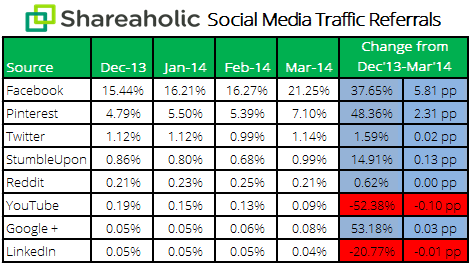
Once again, the real winner here is Facebook, Pinterest may be able to challenge it soon though, as it is now driving just over a third of the traffic Facebook is.